




















 Australian line
Nail salon booking app
The booking app made for nail salons.
Online booking that runs 24/7, a staff calendar the whole team can read at a glance, reminders that cut no-shows and checkout on your EFTPOS terminal — on the iPad at your front desk.
What a nail salon booking system should do
A nail salon is not a doctor's office. Walk-ins arrive between bookings, a full set takes longer than a refill, one technician does art while another only does pedicures, and Saturday fills up days in advance. A generic appointment app treats every booking the same; a nail salon booking app has to know who does what and how long it really takes.
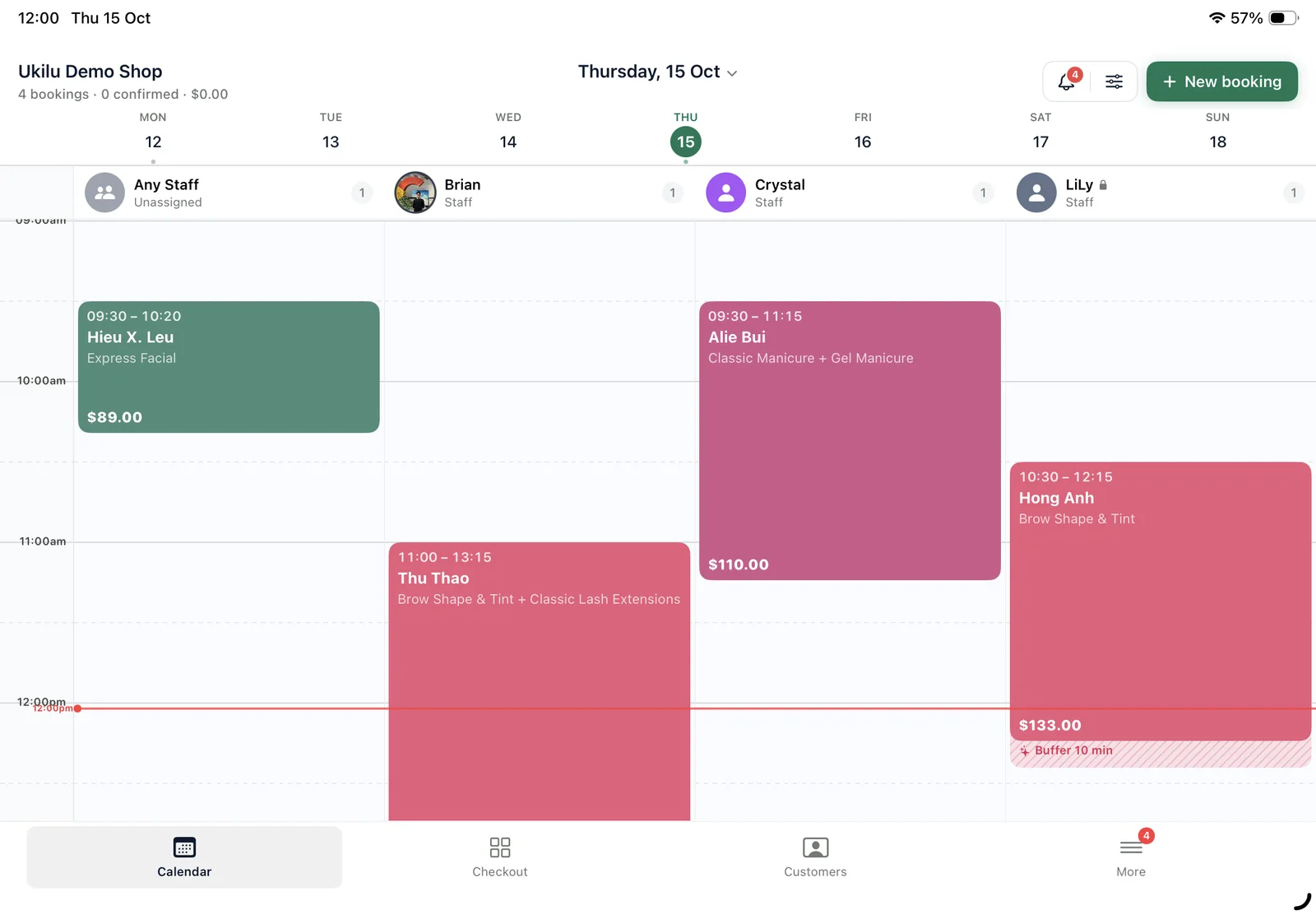
Ukilu was built first for nail salons in Australia. Clients book from your own booking page — or the link in your Instagram bio — and only see the services, technicians and times you choose to offer. Every booking lands in a staff column on the iPad, with buffer time for clean-up, breaks the booking page respects and the next client already lined up.
What's included
Everything in one app.
All of it on the iPad at your counter, with a web dashboard for the office.
Online booking 24/7
Your own booking page with services, prices and technicians. Share it on Instagram, Facebook, Google or your website.
Staff calendar
A column per technician, colour by service, breaks and days off marked, the current time always in view.
Fewer no-shows
Automatic SMS and email reminders, plus deposits paid into your own Stripe account when clients book online.
Walk-ins and check-in
Clients check in with a QR code or on the iPad, and the waiting list keeps walk-ins in order.
Specialist pricing
Set a different price when a senior technician does the service, and show an original price crossed out.
Checkout on your terminal
Bookings drop into the sale; one tap sends the total to KPay or your bank terminal through Linkly.
How it works
From the door to done.
01
Add your menu
Send us your services and client list — we bring them across for free.
02
Share your link
Put your booking page in your Instagram bio, Google listing and website.
03
Clients book
They pick a service, technician and time; a reminder goes out before the visit.
04
Check in, pay, rebook
They arrive, tap in, pay on the terminal and book the next fill.
Payments
Keep the terminal you trust.
Ukilu pairs with KPay and with bank terminals through Linkly — the amount goes straight from the sale to the terminal. Tyro is in certification.
Both. The booking app and online booking page come with the calendar, checkout, EFTPOS, client records, loyalty and SMS marketing in the same app — you don't need a separate POS.
Yes. Clients book from your booking page in any phone or computer browser. Only you and your staff use the Ukilu app on iPad and iPhone.
Yes. Walk-ins can check in on the iPad or with a QR code and wait in the waiting list, and you can add them to any free column in the calendar.
Ukilu sends SMS and email reminders automatically before each visit. You can also take a deposit when clients book online, paid into your own Stripe account.
Yes. You choose which staff offer each service, and you can set specialist pricing when a senior technician does it.
Yes. Setup and import are free — send us your services, staff and client list and our team brings them across.
Also in Ukilu
One app, every part of the salon.
Ready when the rush is.
Pick a plan, sign up and your account is ready straight away. Need a hand moving your clients or menu across? Our team will help.